

All our video editing explainers are waffle-free and work-tested. That’s the pixels.cool guarantee!
Add text and music
Overview
Name of explainer: Add text and music
Creative theme: Video editing
Software used: Vegas Pro
User level: BEGINNER
This is explainer 4 of 5 in this series
This series includes:
- Create a project, import video clips and save the project
- Sequence video clips and render an mp4 file
- Trim video clips, add fades and cross-fades
- Add text and music
- Putting it all together: Stonehenge project!
The Software
This series of beginner explainers uses Vegas Pro. You can download a free 30 day demo version from the Vegas Website.
The Vegas website refers to ‘Vegas Pro’ and ‘Vegas Pro Suite’. As you can see below, the Vegas Pro application can be purchased on its own or as part of a suite of programs which also includes dedicated applications for audio and special effects:.
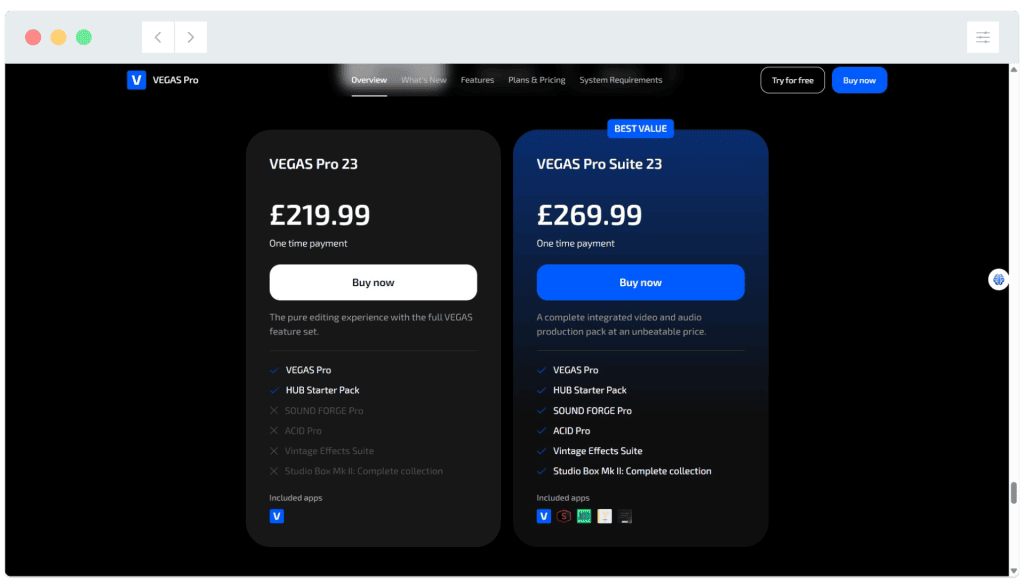
If you decide to purchase Vegas Pro, please review the subscription options first, and bear in mind the different pricing plans available.
The final product
Here’s the simple ‘Spring has sprung’ video we’re creating as we work through explainers 1 to 4. Notice the added text, fades, transitions and music track.
The pre-requisities
This is a BEGINNER workflow explainer, so you just need to install and open the software. We’ll take it from there.
We suggest watching the previous explainers in this series before continuing here.
If you’re new to IT / computing, you may need help downloading and installing the software. Start with a search for ‘how do i install vegas pro’ or speak with someone who’s familiar with downloading and installing.
Why would I do this?
Text is typically added to video sequences as part of a title sequence or to introduce individual scenes or sections (E.g. In explainers).
Almost every video sequence is accompanied by a soundtrack which can be a mix of music, sounds effects, ambience (E.g. A busy street or forest) and narration (VO). You might not realise how critical a well-mixed soundtrack is until it’s ‘wrong’ or ‘missing’. Have a look at this clip…
Let’s do it!
Click the play icon to watch this video. Subtitles are available – Click the settings cog at the bottom right for options. You can also watch this video full-screen by clicking the full-screen icon at the bottom right.
Good to know
Our short springtime video is complete! Join us for the fifth and final entry in this series for ‘Project Stonehenge’. We’ll give you the creative brief and a set of video clips to work with and then it’s over to you to dazzle us!
Download the video clips used in this series
If you’d like to follow this series using the video clips demonstrated, you can download them below. These files are only to be used for personal practice and must not be sold or used commercially.
Where to next?
Vegas Pro also includes built-in options for text animation. In the ‘Video Media Generators’ dialog, have a look at the ‘Animation’ drop-box. Select an animation and see what you think of it! Below we’ve selected ‘Double Flash Glow’:

VEGAS also includes templates for scrolling and animated titles. Click on the Media Generator tab then ‘Titles and Text’ to see animated previews…


If you’re interested in sound design for film, you’ll need to know what diegetic and non-diegetic sound is. Ready for a fun primer?
Notes and updates
There are no notes or advisories at this time. This video explainer was last updated in March 2023. This page was last updated in March 2026.
We at pixels.cool are not responsible for the content of any external webpages or software downloaded from third party sites. Links are included in good faith at the time of writing. All explainer content is compiled in good faith using processes and methods used by the team. Modern software gives users many ways in which to accomplish the same task, and for reasons of clarity we choose not to reference multiple options. All computer users should run up to date virus / security software at all times to minimise risk.
This is number 4 of 5 explainer videos for video editing month. Make sure you check out the others!
